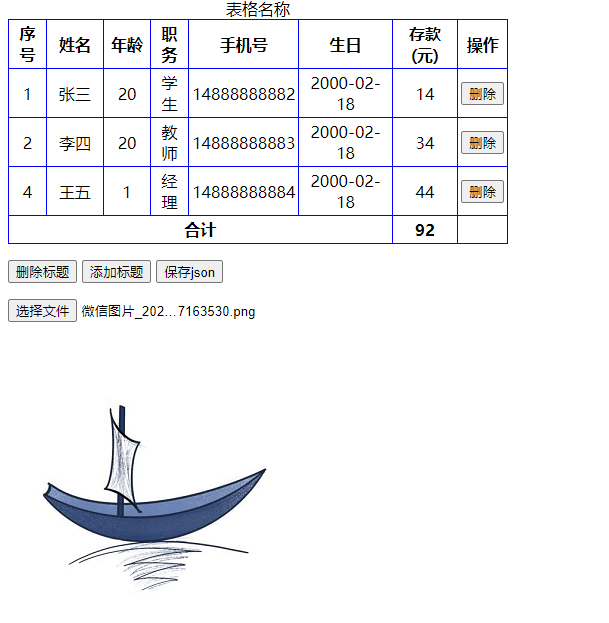
用到的table的方法和属性
Table 对象方法
createCaption() 为表格创建一个 caption 元素。
createTFoot() 在表格中创建一个空的 tFoot 元素。
createTHead() 在表格中创建一个空的 tHead 元素。
deleteCaption() 从表格删除 caption 元素以及其内容。
deleteRow() 从表格删除一行。
deleteTFoot() 从表格删除 tFoot 元素及其内容。
deleteTHead() 从表格删除 tHead 元素及其内容。
insertRow() 在表格中插入一个新行。
let active = event.srcElement || event.target;
console.log('行号:' + active.parentElement.rowIndex + ',列号:' + active.cellIndex);
<!DOCTYPE html>
<html lang="en">
<head>
<meta charset="UTF-8" />
<meta http-equiv="X-UA-Compatible" content="IE=edge" />
<meta name="viewport" content="width=device-width, initial-scale=1.0" />
<title>Document</title>
</head>
<style type="text/css">
table {
border: 1px solid blue;
width: 500px;
border-collapse: collapse;
}
td,
th {
text-align: center;
border: 1px solid blue;
padding: 3px;
}
</style>
<body>
<!-- 实现的功能
表格可编辑的部分,双击就可以生成一个输入框,并且自动获取输入框焦点
在输入框输入修改的内容之后,当输入框失去焦点的时候就会判断输入的内容是否满足条件。
如果满足条件就修改内容,如果不满足条件就弹出提示
修改的内容再修改原始的数据 -->
<table id="table">
<caption>
表格名称
</caption>
<thead>
<tr>
<th>序号</th>
<th style="width: 50px">姓名</th>
<th style="width: 40px">年龄</th>
<th>职务</th>
<th>手机号</th>
<th>生日</th>
<th>存款(元)</th>
<th>操作</th>
</tr>
</thead>
<tbody id="tbody">
<tr>
<td>02</td>
<td>张三</td>
<td>12</td>
<td>学生</td>
<td>139123412345</td>
<td>20211206</td>
<td>20</td>
<td></td>
</tr>
</tbody>
<tfoot id="tdfoot">
<tr>
<th colspan="6">合计</th>
<th></th>
<th></th>
</tr>
</tfoot>
</table>
<p>
<input type="button" value="删除标题" onclick="delCap()" />
<input type="button" value="添加标题" onclick="creCap()" />
<input type="button" value="保存json" onclick="clickSaveJson()" />
</p>
<p>
<input type="file" id="fileInput" value="读取文件" />
</p>
</body>
<script type="text/javascript">
//模拟一段JSON数据,实际要从数据库中读取
var data = [
{
id: 001,
name: '张三',
age: 20,
job: '学生',
phone: '14888888882',
birthday: '2000-02-18',
price: 14,
},
{
id: 002,
name: '李四',
age: 20,
job: '教师',
phone: '14888888883',
birthday: '2000-02-18',
price: 34,
},
{
id: 004,
name: '王五',
age: 1,
job: '经理',
phone: '14888888884',
birthday: '2000-02-18',
price: 44,
},
];
// 让data里面的内容显示在tbody里面去,生成一个表格
window.onload = function () {
// tbody.appendChild(trow);
// data.forEach((item) => {
// var trow = getDataRow(item);
// tbody.appendChild(trow);
// });
};
var tbody = document.getElementById('tbody');
tbody.innerHTML = ''; //清空表格
data.forEach((item) => {
var trow = getDataRow(item);
tbody.appendChild(trow);
});
// 封装的生成列函数
function getDataRow(h = {}) {
if (!Object.keys(h).length) {
return;
}
let row = document.createElement('tr');
for (var key in h) {
var cell = document.createElement('td');
cell.innerText = h[key];
row.appendChild(cell);
}
// 创建删除操作节点
var delCel = document.createElement('td');
row.append(delCel);
var btnDelete = document.createElement('input');
btnDelete.setAttribute('type', 'button');
btnDelete.setAttribute('value', '删除');
btnDelete.addEventListener('click', function () {
console.log(this.parentNode.parentNode.innerHTML);
if (confirm('确定删除本行?')) {
this.parentNode.parentNode.parentNode.removeChild(this.parentNode.parentNode);
// 重新计算赋值
document.getElementById('tdfoot').getElementsByTagName('th')[1].innerHTML = caletotal(
'tbody',
6
);
}
});
delCel.appendChild(btnDelete);
return row;
}
// 赋值给合计
document.getElementById('tdfoot').getElementsByTagName('th')[1].innerHTML = caletotal(
'tbody',
6
);
// 金额求和
function caletotal(table, column) {
// 方式一 rows,cells
var table = document.getElementById(table);
// 行数
var rows = table.rows.length;
// 列数
var cols = table.rows[0].cells.length;
var total = 0;
for (var i = 0; i < rows; i++) {
let t = parseFloat(table.rows[i].cells[column].innerText);
if (t) total += t;
}
var value = parseFloat(table.rows[0].cells[6].innerText);
console.log(rows, cols, value);
//方式二 byTagName("td") 数组
var total = 0;
var trs = table.getElementsByTagName('tr');
for (var i = 0; i < trs.length; i++) {
var td = parseFloat(trs[i].getElementsByTagName('td')[column].innerText);
// let t = table.rows[i].getElementsByTagName('td')[column];
if (td) total += td;
}
return total;
}
function delCap() {
document.getElementById('table').deleteCaption();
}
function creCap() {
var cap = document.getElementById('table').createCaption();
cap.innerHTML = 'createCaption()增加的标题';
cap.style.color = 'green';
}
// 绑定单元格编辑时间
bindTdClick(event);
function bindTdClick() {
var tbody = document.getElementById('tbody');
tbody.addEventListener('dblclick', function () {
let active = event.srcElement || event.target;
console.log(active.cellIndex === 0);
if ((active.tagName !== 'TD' && active.tagName === 'INPUT') || active.cellIndex === 0) {
return;
}
// console.log(this, event, active.tagName, active.innerText);
console.log('行号:' + active.parentElement.rowIndex + ',列号:' + active.cellIndex);
if (active.tagName === 'INPUT') {
return;
}
var inputs = document.createElement('input');
var oldValue = active.innerText;
inputs.value = active.innerText;
inputs.type = 'text';
inputs.style.display = 'inline-block';
inputs.style.border = '2px solid #ddd';
inputs.style.textAlign = 'center';
inputs.style.fontSize = '16px';
inputs.style.padding = '0 0';
inputs.style.margin = '0 0';
inputs.style.width = '94%';
active.innerHTML = '';
active.appendChild(inputs);
inputs.focus();
var reg = {
name: /^[\u4E00-\u9FA5\uf900-\ufa2d]{1,8}$/,
age: /^(?:[1-9][0-9]?|1[01][0-9]|120)$/,
job: /^\S*$/,
phone: /^1(3|4|5|7|8)\d{9}$/,
birthday:
/^((19[2-9]\d{1})|(20((0[0-9])|(2[0-1]))))\-((0?[1-9])|(1[0-2]))\-((0?[1-9])|([1-2][0-9])|30|31)$/,
price: /^\d{0,6}$/,
};
var colsName = ['id', 'name', 'age', 'job', 'phone', 'birthday', 'price'];
inputs.addEventListener('blur', function () {
var td = document.createElement('td');
console.log(reg[colsName[active.cellIndex]], inputs.value);
if (reg[colsName[active.cellIndex]].test(inputs.value)) {
active.innerText = inputs.value;
if (colsName[active.cellIndex] === 'price')
document.getElementById('tdfoot').getElementsByTagName('th')[1].innerHTML = caletotal(
'tbody',
6
);
} else {
active.innerText = oldValue;
alert('格式错误');
}
});
});
}
// 保存为json文件格式
function clickSaveJson() {
var table = document.getElementById('tbody');
var data = [];
var colsName = ['id', 'name', 'age', 'job', 'phone', 'birthday', 'price'];
for (var i = 0; i < table.rows.length; i++) {
var temp = {};
console.log(table.rows[i], table.rows[0].cells.length);
for (var j = 0; j < table.rows[0].cells.length - 1; j++) {
temp[colsName[j]] = table.rows[i].cells[j].innerText;
}
data.push(temp);
}
console.log(data);
// var blob = new Blob([JSON.stringify(jsonObj)], { type: 'text/plain;charset=utf-8' });
// saveAs(blob, 'info.json');
}
// 读取本地文件
// 出于安全和隐私的原因,web 应用程序不能直接访问用户设备上的文件。如果需要读取一个或多个本地文件,可以通过使用input file和FileReader来实现。
document.getElementById('fileInput').addEventListener('change', function selecedFileChange() {
console.log(this.files);
if (this.files.length === 0) {
console.log('no file');
return;
}
const reader = new FileReader();
reader.onload = function fileReadCompleted() {
// load:在成功加载后就会触发。
console.log(reader.result);
if (reader.result.indexOf('data:image') === -1) {
console.log(JSON.parse(reader.result).data);
} else {
const img = new Image();
img.src = reader.result;
document.body.appendChild(img);
}
};
if (this.files[0].type === 'application/json') reader.readAsText(this.files[0]);
if (this.files[0].type === 'image/png') reader.readAsDataURL(this.files[0]);
});
</script>
</html>